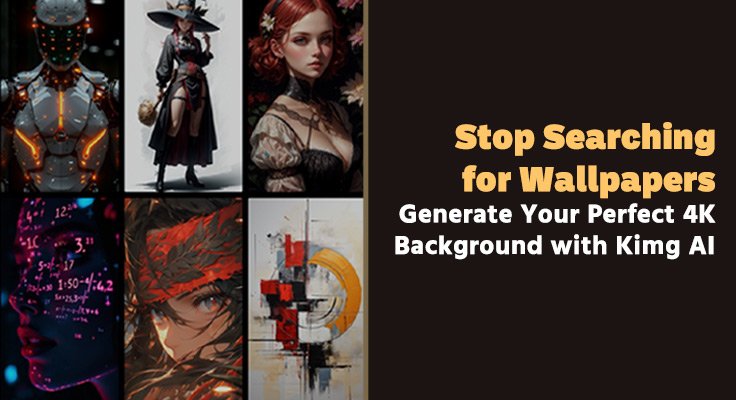
Endless scrolling through wallpaper sites rarely ends with the exact background that matches a screen, mood, and personal style. With Kimg AI, that hunt stops and a clear path appears: describe the scene, choose the right model, and instantly turn ideas into sharp 1K, 2K, or 4K wallpapers tailored to any device. Whether the goal is a focused workspace, a cinematic gaming backdrop, or a branded studio look, Kimg AI turns imagination into screen‑ready images in just a few steps.
The easiest way to experience this is to try Nano Banana Pro in Kimg AI, then see how it converts short prompts into wallpapers that feel custom‑made instead of downloaded from a generic gallery.
I. Why Generic Wallpaper Sites Keep Letting Users Down
- Recycled visuals and limited personality
Most wallpaper libraries lean on the same themes: neon skylines, abstract gradients, and stock‑style photography that appears across countless devices. This repetition makes it hard for a screen to feel personal. Even after long browsing sessions, the final choice often feels like a compromise instead of a perfect fit.
- Resolution mismatch on modern screens
Many wallpapers are optimized for older displays, not current 4K monitors, laptops, and tablets. When stretched to fill larger screens, small images show jagged edges, washed‑out details, and compression noise. A background that looked fine in a thumbnail suddenly appears soft and flat when used day to day.
- Time wasted searching instead of creating
Hunting through categories, tags, and endless “next page” clicks takes energy away from actual work or play. People frequently settle for “good enough” because the process of searching feels tiring. What they really need is a way to describe the picture in their head and receive it directly at the right resolution.
II. How Kimg AI Turns Simple Prompts into 4K Wallpapers
- Text‑to‑image that understands real scenes
In Kimg AI, wallpaper creation can start with a single line of text. A prompt like “dark navy coding setup with subtle teal glow and soft vignette” already contains enough information for the system to build a complete scene. Instead of fitting tastes into fixed categories, the tool adjusts to the description and purpose of the wallpaper.
- Flexible image‑to‑image for custom looks
Beyond pure text, users can upload a photo—such as a city skyline, a workspace, or a portrait—and let Kimg AI transform it into a stylized background. The core composition remains, while lighting, color palette, and artistic style shift toward the desired mood. This approach is ideal when the base image is meaningful but not yet ready for a screen.
- Clear control over image size and aspect ratio
The generation panel in Kimg AI allows selection of aspect ratios such as 1:1, 16:9, and others, followed by resolution options of 1K, 2K, or 4K. These controls make it straightforward to match a specific display without guessing or manual cropping. Users choose both shape and resolution before pressing “Generate Image,” which keeps the workflow clean.
III. Why Nano Banana Pro Stands Out for Wallpaper Creation
- Designed for high‑quality 4K results
Inside Kimg AI, Nano Banana Pro focuses on producing sharp, high‑fidelity images up to 4K resolution. Its output captures fine textures, lighting nuances, and depth that remain clear even on large monitors and TVs. For users who care about clarity and detail, this model becomes the natural choice.
- Strong understanding of detailed prompts
Nano Banana Pro handles complex instructions that specify mood, environment, and subject. When a prompt describes “calm dusk light over a futuristic city, wide view, no characters, focus on architecture,” the composition reflects those details rather than returning a generic scene. The model’s strength lies in turning nuanced ideas into precise visuals.
- Balanced style for both realism and art
Wallpapers generated with Nano Banana Pro can look photographic, painterly, or somewhere in between, depending on how the prompt is written. This flexibility allows professional users to request clean, realistic office scenes while hobbyists can explore stylized fantasy worlds or anime‑inspired backdrops. In every case, the 4K cap ensures the final image remains crisp.
IV. Using Nano Banana Pro AI for Different Wallpaper Needs
- Minimal setups that reduce distraction
For focused work environments, Nano Banana Pro AI can generate subtle gradients, soft light streaks, or abstract geometry that keeps icons visible. A short prompt like “soft charcoal and teal gradient, gentle diagonal glow, no objects” yields a calm, uncluttered background. This kind of wallpaper supports concentration without feeling sterile.
- Cinematic and gaming‑inspired backgrounds
Players who want their desktop to echo their favorite genres can describe environments instead of referencing specific titles. Phrases like “rain‑soaked neon alley with reflections on the ground” or “ancient temple ruins under a stormy sky” lead to dramatic 4K scenes. The result is a screen that captures a familiar atmosphere while staying original.
- Creative themes for hobbies and passions
Artists, photographers, and hobbyists can tailor wallpapers around what they love—music, travel, sports, or nature. For example, a musician might ask for “close‑up of a guitar neck lit by warm studio lights,” while a traveler might prefer “aerial view of islands in turquoise water.” Nano Banana Pro AI faithfully turns each idea into a backdrop that feels personal.
V. Transforming Existing Photos into K‑Level Backgrounds
- Photo upload and transformation on the Image page
On the dedicated image page of Kimg AI, users can upload their own photos and transform them rather than starting from scratch. A vacation snapshot, a pet portrait, or a city skyline can be enhanced and stylized while keeping the original memory intact. This method turns everyday photos into polished wallpapers.
- Artistic styles without losing composition
The photo transformer can reinterpret structure and lighting without breaking the underlying scene. A standard shot can become an oil painting, anime‑style frame, or 3D render, while subjects and framing remain recognizable. That makes it ideal for users who like their photos but want a more atmospheric look for their desktop or phone.
- Consistent themes across multiple images
Because the same prompt and style can be applied to different photos, it is easy to create a series of wallpapers that share a coherent mood. A set of city night shots, for example, can be turned into a unified collection with matching color grading and lighting style. This consistency helps multi‑screen setups feel thoughtfully designed.
VI. Fine‑Tuning Details with Other Kimg AI Models
- Context‑aware edits for precise adjustments
When only certain elements of a wallpaper need changes—such as the sky, reflections, or foreground objects—other models inside Kimg AI can adjust parts of the image while keeping the rest intact. This allows a user to fix distracting elements or tune color balance without starting over. The final wallpaper looks intentional rather than random.
- Clean text and branding inside the image
Sometimes a wallpaper requires a logo, slogan, or short phrase to sit naturally inside the scene. Text‑aware generation within Kimg AI helps integrate typography directly into the image with clean edges. This is helpful for creators who want desktop backgrounds that double as branded overlays for streams, calls, or presentations.
- Quick exploration followed by high‑quality final renders
Lighter models are suitable for fast concept exploration, producing several rough versions from different prompts. Once a strong composition emerges, Nano Banana Pro can be selected for the final 4K render. This two‑step approach combines speed during ideation with maximum clarity in the finished wallpaper.
VII. A Simple Workflow for Your Next 4K Wallpaper
- Plan the mood, colors, and device
Before opening Kimg AI, it helps to think about where the wallpaper will live and how it should feel. For a coding monitor, muted colors and soft contrast work well; for a gaming setup, deeper shadows and accent highlights stand out. Writing this intention into the prompt gives the model clear direction.
- Choose Nano Banana or Nano Banana Pro wisely
For quick ideas at modest resolutions, the standard Nano Banana model can be enough. When clarity and detail matter—especially for 4K backgrounds—Nano Banana Pro is the better choice. It refines textures, lighting, and edges so the final image remains clean even when viewed up close.
- Pick the correct aspect ratio and resolution
Selecting the right aspect ratio and then choosing 1K, 2K, or 4K ensures the wallpaper fits the screen without awkward cropping. Wide monitors benefit from horizontal formats, while phones need vertical ones. Matching these options to the device prevents the common issue of important details being cut off.
- Iterate, then save favorites as a personal library
Generating multiple versions of a scene and comparing them side by side helps reveal what truly works. Over time, users can build a private library of wallpapers that match different moods—deep focus, relaxed browsing, or high‑energy gaming. Every new prompt adds another piece to a collection that feels fully personal.
VIII. Stop Searching, Start Generating with Kimg AI
Traditional wallpaper sites only offer what someone else has uploaded. They do not know a user’s workflow, lighting, or taste, and they cannot adapt to a specific screen. Kimg AI, through models like Nano Banana Pro, closes that gap by turning plain language and simple photos into 4K backgrounds tuned to real needs.
Instead of settling for “almost right,” users can describe exactly what they want and generate it on demand. From distraction‑free gradients to richly detailed fantasy vistas, every device can carry a wallpaper that mirrors the owner’s style. With Kimg AI, the search bar on wallpaper sites becomes optional—creativity takes its place.