The hardest part of making a song is often not the melody. It is the decision pressure that appears before any sound exists: what genre should this be, how long should it feel, should it include vocals, and will the result be usable for a real project instead of a quick demo. In that context, AI Music Generator becomes less about replacing musicians and more about helping creators move from uncertainty to a first workable direction.
Many AI music tools promise speed, but speed alone does not solve creative hesitation. What matters in practice is whether the interface helps you make fewer bad decisions at the beginning. In my observation, ToMusic AI is most useful when you treat it as a decision engine: you bring intent, the system turns that intent into a draft, and then you evaluate what deserves refinement. That framing also makes its limitations easier to handle, because you stop expecting perfect output on the first try.
Why Creative Friction Starts Before Audio Generation
Most people think music generation begins when you click a button. In reality, it begins when you try to describe what you want. If your request is too broad, outputs can feel generic. If your request is too specific, you can accidentally overconstrain the model and lose musical surprise.
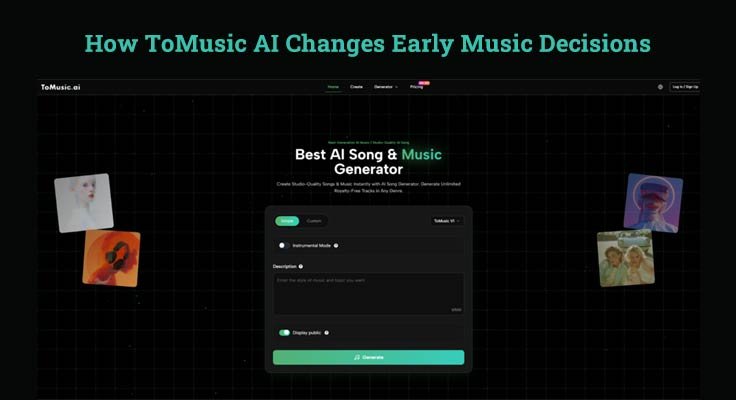
This is where ToMusic AI’s structure helps. The platform presents a flow that starts with a choice between simple and custom generation, then lets you select a model version, then enter a description or lyrics, and finally generate. That sequence may sound basic, but it is useful because it mirrors how real creators think: first decide how much control you need, then pick a generation strategy, then provide material.
A Better Way To Frame Prompt Quality
Prompt quality is not only about writing more words. It is about writing the right signals. In my testing style, the most helpful signals tend to be:
- Mood
- Tempo feel
- Instrument preference
- Vocal or instrumental intent
- Use case context
A short prompt that clearly defines these often performs better than a long paragraph filled with abstract adjectives.
How ToMusic AI Organizes User Choices Clearly
ToMusic AI presents a practical split between Simple mode and Custom mode. This matters because different users fail in different ways. Beginners usually fail from too many options. Experienced users usually fail from too few controls.
Simple Mode Fits Fast Validation Workflows
Simple mode is useful when you are validating an idea, not finalizing it. For example, if you are testing whether a video intro works better with upbeat electronic energy or a softer cinematic mood, quick generation matters more than perfect phrasing.
In my view, this is where the tool feels most efficient: you can move from concept to audible sample quickly, then decide whether the idea deserves deeper work.
Custom Mode Supports Intentional Song Shaping
Custom mode becomes more valuable when lyrics, structure, or genre precision matters. ToMusic AI describes support for custom lyrics and style control, which changes the workflow from “surprise me” to “help me execute a direction.” That distinction is important for creators making content with narrative, branding, or emotional timing.
A second useful pattern is using Text to Music AI not as a final composer, but as a pre-production collaborator. You can test several emotional directions before investing more effort in editing, mixing elsewhere, or re-generation.
Where Model Choice Affects Expectations Most
ToMusic AI also highlights multiple model versions (V1 to V4), each with different strengths. Whether or not a user compares every version, this model choice teaches an important habit: different generation engines are good at different tasks.
For example, when a platform indicates one version is faster and another offers stronger vocals or longer compositions, it helps users choose the right benchmark. If you use a speed-focused model and expect polished vocal nuance, you may judge the tool unfairly. If you use a higher-capability model for a rough brainstorm, you may be spending time where you do not need to.
A Realistic Three-Step Workflow From The Official Flow
Below is a clean workflow based on the platform’s visible process and FAQ descriptions, simplified into three steps.
Step One Select Mode And Model Version
Choose Simple or Custom depending on how much control you need, then select a model version (such as V1–V4). This is the main strategic decision because it determines the balance between speed and control.
Step Two Enter Description Or Custom Lyrics
Provide either a text prompt or your own lyrics. If you use custom lyrics, adding clear section labels like verse and chorus can improve structure in many AI music workflows, and ToMusic AI explicitly references structured lyric tags.
Step Three Generate Then Evaluate Intentionally
Generate the track, listen once for emotional match, and listen again for usability. Those are different tests. A track can feel emotionally correct but still fail on pacing, clarity, or vocal fit. When it misses, revise the prompt rather than assuming the idea itself was wrong.
What ToMusic AI Makes Easier Than Traditional Setup
Traditional music production often requires multiple tools and skills before a first draft appears. You need composition decisions, arrangement ideas, software familiarity, and enough time to build a version worth evaluating.
ToMusic AI reduces the distance between idea and draft. That does not eliminate craftsmanship, but it changes where craftsmanship happens. Instead of spending all your energy on assembly, you spend more on taste: selecting, comparing, refining, and deciding what matches your project.
Comparison Table For Understanding Practical Differences
| Workflow Need | Traditional Early Workflow | ToMusic AI Workflow | Practical Impact |
| First audible draft | Often slow to produce | Usually quick to generate | Faster validation of ideas |
| Musical training requirement | Higher for clean results | Lower to start | More accessible entry point |
| Lyric-to-song testing | Manual composition needed | Built-in prompt or lyric generation path | Easier experimentation |
| Instrumental option | Requires arrangement setup | Can choose instrumental direction | Faster background music creation |
| Iteration speed | Depends on DAW editing time | Prompt revision and regenerate | Better for comparison cycles |
Where The Tool Still Requires Human Judgment
The strongest use case is not “type one sentence and publish.” It is “generate candidates, then make decisions.” Results still depend heavily on the prompt, and some generations may need multiple attempts before the tone, pacing, or vocal feel aligns with your goal.
Common Mistakes That Lower Output Quality
Many weak outputs come from workflow mistakes, not model failure:
- Asking for conflicting moods
- Ignoring tempo cues
- Using overly abstract genre descriptions
- Writing lyrics without rhythmic phrasing
- Expecting final-master quality from first generation
These issues are fixable, but they require a calmer evaluation process.
Why Credibility Improves When You Admit Limits
A trustworthy AI music workflow includes room for misses. In my observation, creators who get the best results from tools like ToMusic AI are not the ones who expect magic. They are the ones who iterate carefully, keep prompts concrete, and compare outputs against a specific use case such as an intro clip, ad cue, or background loop.
How ToMusic AI Fits Modern Creator Work Habits
Short-form video, indie game prototyping, quick campaign drafts, and personal songwriting all share one constraint: time. Tools that reduce setup time without removing creative choice tend to become useful even when they are not perfect.
ToMusic AI fits that pattern well when used as a first-draft system. Its official flow is simple enough for new users, while the custom path and model selection create room for more deliberate experimentation. The result is not that music creation becomes effortless. The result is that the earliest, most fragile stage of music decisions becomes easier to start, easier to test, and easier to revise.