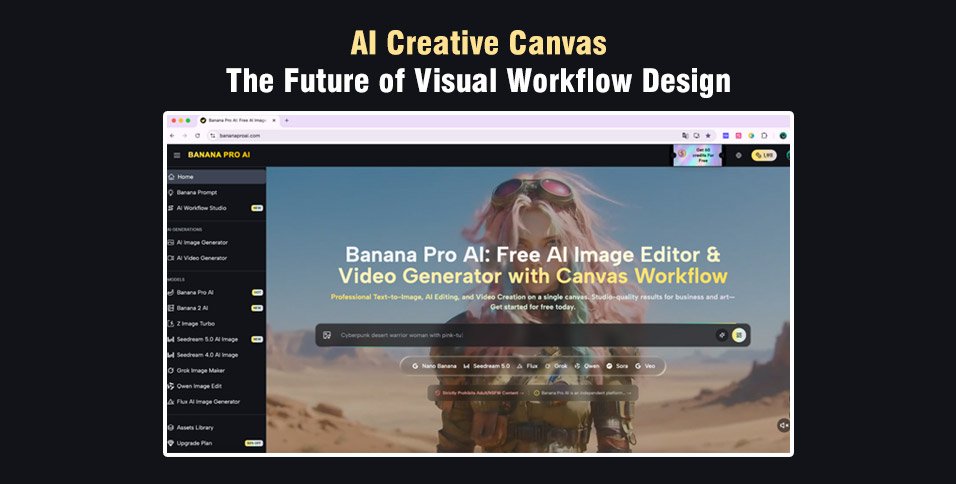
For years, AI-powered content creation meant opening a tool, typing a prompt, downloading the result, and starting over. The process was linear, fragmented, and creatively limiting. But a new paradigm has arrived — one built around the concept of the AI Creative Canvas: an infinite, node-based workspace where every idea, image, and video lives as a connected element in a larger visual workflow.At the forefront of this movement is AI Creative Canvas, a free AI Creative Canvas that brings together image generation, video production, and multi-model workflows inside a single, intuitive visual environment. Whether you’re a solo designer, a content team, or a brand studio, the canvas-first approach changes not just how you create — but how you think about creating.
What Is an AI Creative Canvas?
An AI Creative Canvas is best understood in contrast to what came before. Traditional AI generation tools present a single input field: you write a prompt, hit generate, and receive an output. The result is siloed. There is no memory of how you got there, no visual relationship between one generation and the next, and no way to chain outputs into a coherent creative pipeline without manually copying files between applications.
A canvas changes this entirely. Nodes — discrete units representing text prompts, image generators, video models, or uploaded assets — sit on an infinite zoomable workspace. You can connect them: a text node feeds its prompt into an image node; that image becomes the reference frame for a video node. The entire creative journey is visible, editable, and repeatable at a glance.
This is the architecture behind Banana Pro AI Studio — and it represents something genuinely new in the AI tooling landscape.
Key capabilities at a glance:
- Infinite Canvas — Pan, zoom, and arrange nodes across an unbounded workspace with no page limits and no hidden menus.
- 9+ AI Models — Access GPT-4o Image, Flux Kontext, Veo 3.1, Seedream, Grok Imagine, and more from one unified interface.
- Zero Lost Work — A dual-layer auto-save system keeps every node, connection, and generation safe, both locally and in the cloud.
A Multi-Model Ecosystem in One Workspace
One of the most significant advantages of Banana Pro AI Studio as an AI Creative Canvas is the breadth of models it brings together. Rather than committing to a single generation engine, creators can choose the right model for each node — or experiment across multiple models within the same project.
Image Generation Models:
- Nano Banana Pro — High-quality generation with reference image support
- GPT-4o Image — OpenAI’s latest model for detailed and nuanced prompts
- Flux Kontext Pro / Max — Advanced style transfer and image-to-image editing
- Z-Image Turbo — Ultra-fast text-to-image generation for rapid ideation
- Seedream 5.0 — High-fidelity artistic and photorealistic output
- Grok Imagine — Creative generation with reference image support
- Qwen Image Edit — Precise editing and transformation of existing images
Video Generation Models:
- Veo 3.1 Premium — Top-tier video quality with text-to-video and image-to-video support
- Veo 3.1 Basic — High-quality video generation at a lower credit cost
- Veo 3 Premium / Basic — Advanced and accessible video creation options
The ability to switch models within the same workflow — without exporting, reformatting, or starting over — is a capability that professional creators have long needed. On an AI Creative Canvas, it’s simply how the tool works by design.
How to Use AI Creative Canvas
For those new to canvas-based AI creation, the learning curve is deliberately minimal. The Banana Pro AI Studio walks users through the entire process from an empty canvas to a completed multi-step workflow. Here’s the core journey:
Step 1 — Create a Project & Open the Canvas
From the Studio dashboard, start a new project. The canvas opens immediately — an infinite workspace where every element is auto-saved in real time as you work.
Step 2 — Add Your First Nodes
Click or drag from the sidebar to place Image, Video, Text, or Upload nodes onto the canvas. Each node type is clearly labeled and purpose-built for its function.
Step 3 — Connect Nodes into a Pipeline
Drag from a node’s output handle to another’s input to establish a dependency. The system validates connections automatically, preventing incompatible links before they cause errors.
Step 4 — Generate, Preview & Iterate Hit
Generate on any node to produce AI content in seconds. Regenerate with adjusted prompts, switch models mid-workflow, or use “Based on This” to branch into new creative directions without losing your original output.
Step 5 — Export & Continue
Every output is saved to your project history. Export high-resolution files without watermarks, revisit past generations in the History panel, or keep building on the same canvas indefinitely.
Why the AI Creative Canvas Wins
1. Your Entire Creative Process Becomes Visible
The shift toward visual, canvas-based AI workflows is not a cosmetic upgrade. When every prompt, every output, and every connection lives on one infinite surface, you gain something isolated tools cannot offer: creative memory. You can see where your project started, how it evolved, and which directions you explored — all at a glance.
2. Real Creative Work Is Never Linear
Professional creation happens through branching, iteration, and exploration — not a straight line from prompt to output. The canvas mirrors this reality. You can revisit any node, adjust any connection, and pursue multiple directions simultaneously without losing track of where you’ve been or where you’re going.
3. Complexity Becomes Intuitive
Multi-step workflows that once required three separate applications now live in a single workspace. Connecting a text prompt to an image model to a video generator is a matter of dragging handles — no coding, no file management, no context switching. The visual structure carries the complexity so you don’t have to.
4. The Best Tools Build for How Creators Actually Think
Banana Pro AI Studio is one of the clearest examples of this philosophy in practice — combining powerful multi-model generation with a canvas workspace that makes complex creative workflows feel not just possible, but natural. For anyone who has felt constrained by the single-prompt model, the AI Creative Canvas is not the future. It’s already here, and it’s free to use.
Conclusion
The AI Creative Canvas is not a trend — it’s a better way to work. Visual workflows, connected nodes, and multi-model generation give creators the speed, clarity, and control that isolated tools never could.
If you’re ready to move beyond single-prompt generation, Banana Pro AI Studio is the place to start — free, no credit card required.