Your commute can feel predictable until glare washes out the road, a last-second merge sparks a dispute, or a minor bump in traffic leaves you trying to explain what you saw from memory. A single forward-facing view can miss the angle that settles questions, and parking problems can happen while your car is off, when power, settings, and storage decide whether anything is recorded. If you are weighing what makes a best buy dash cam, understanding multi-camera coverage helps you choose a setup that documents what matters when you need it most.
When Multi-View Coverage Fits You
A three-camera setup records front, rear, and cabin views, so you are not relying on one angle when something happens. Vantrue’s N4 Pro S adds HDR, infrared cabin night recording, GPS context, loop recording, and optional hardwired parking monitoring; when deciding on a best buy dash cam, focus on stable coverage and quick clip protection rather than expecting perfect plate capture every time.
Why Multi-Camera Coverage Matters
Common Commute Risks to Record
Multi-angle video helps you reconstruct a timeline when one view leaves questions. For commuting, that often means rear-end impacts, close passes from behind, sideswipes during merges, and disagreements at intersections where sequence and distance matter more than the instant of contact.
Three-View Baseline for Commutes
A practical baseline is front, rear, and cabin. The front view captures lane markings, signals, and hazards you approach—the rear view documents tailgating and rear impacts. The cabin view adds context when in-vehicle activity is relevant, especially for rideshare driving or carpools. If you use a cabin camera, consider privacy rules and whether you want audio on.
Capturing Details in Tough Lighting
Handling Tunnels, Glare, and Night
Tunnel entries, low sun, and oncoming headlights create rapid exposure shifts. HDR can help balance highlights and shadows so you keep context during those transitions. You also improve results by mounting the camera securely, aiming it level, and maintaining the glass clean to reduce flare.
Low-Light Road and Cabin Footage
Low light is challenging because motion continues while the camera gathers light. You want footage that preserves contrast and limits blur so moving vehicles and lane lines stay recognizable. For the cabin, infrared lighting can record in darkness without turning on bright interior lights that distract you.
Identifying Details Without Promises
License plates are often the first detail you hope to capture, and they are also easy to miss when speed, vibration, rain spray, or glare gets involved. Treat “plate-enhancing” features as an improvement in odds, not a guarantee. For your part, prioritize stable mounting, correct aim, and settings that do not overexpose headlights at night.
Parking Security and Clip Protection
Parking Mode Power Basics
Parking surveillance depends on power while the engine is off. Longer monitoring typically requires hardwiring, so confirm your power plan before you rely on parking mode. Decide whether you want continuous capture or event-based recording, and learn how your system triggers and stores those clips.
Storage Planning for Continuous Capture
Multi-camera recording creates larger files, and that makes storage planning part of reliability. Loop recording automatically overwrites older footage, but you still need enough capacity to cover your routine, including parking time if you enable it. Use a card rated for continuous recording and maintain it so corrupted files do not ruin the moment you need.
Protecting Clips After Incidents
Clip protection keeps a key moment from being overwritten on the next loop. Look for an easy way to lock footage, such as an emergency button or an automatic lock tied to impact detection. After any incident, export the clip as soon as you can and keep a backup copy.
Connectivity and Trip Context
Wireless Transfer and App Review
Wireless transfer reduces friction when you need a clip fast. Instead of pulling a memory card, you can review the moment, confirm key details, and save what matters while the event is still clear in your mind. With Vantrue, the N4 Pro S supports 5GHz Wi-Fi and companion app control, making it easier to review and share large, multi-channel files.
GPS Context for Incidents
GPS adds time, location, speed, and route context to your video. That helps you match a clip to a precise point on your commute and build a cleaner timeline when you are describing what happened.
What to Compare for Commutes
| Feature | Why It Helps You | What to Look For |
| Multi-view coverage | Adds angles and context | Front, rear, and cabin options |
| HDR and night support | Helps in glare and darkness | Consistent exposure across views |
| Parking recording | Covers parked incidents | Hardwire support and clear modes |
| Clip locking | Prevents overwrite | Manual and automatic protection |
| GPS logging | Adds time and location | Simple playback with route context |
| Wireless transfer | Speeds up review | Stable connection and easy app use |
Choosing a Multi-Camera Setup
Reliability, Power, and Heat
A dash cam lives in heat, cold, and vibration. Reliability is not only about video quality. It is also stable in power and temperature tolerance. If your car sits in direct sun, pay attention to how the device handles heat and whether its power design is intended for extreme temperatures.
Installation, Mounting, and Routing
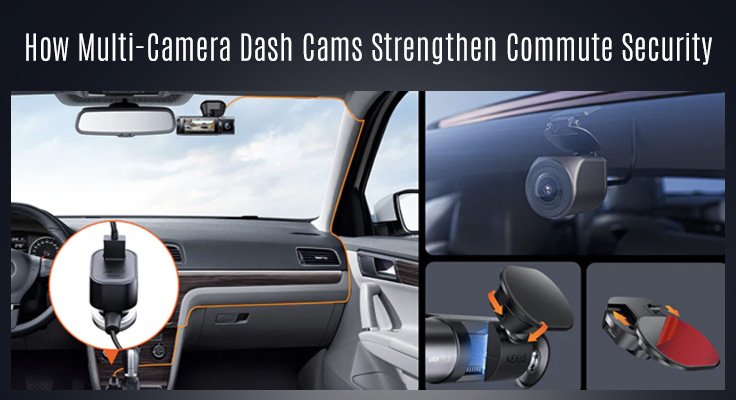
Mount the camera where it does not block your view, aim it level, and route cables along the trim and headliner where possible. Avoid airbag paths. Before you finalize placement, record a short daylight clip and a short night clip and adjust for reflections.
Rear Camera Durability Outdoors
Suppose your rear camera is designed for exterior mounting, weather resistance, and a high-quality cable. Even with interior mounting, you want a secure attachment that will not loosen with heat and vibration.
Conclusion
Multi-camera recording helps you document the full context of daily driving, from harsh lighting to confusing angles to parking incidents. If you want a simple way to judge whether a model earns the label ‘best buy dash cam,’ prioritize three-view coverage, night performance, parking power options, and a workflow that makes it easy to lock and retrieve clips. If you want a benchmark example, Vantrue’s three-view approach shows how modern commuter-focused features can fit into a single integrated setup.